
1. Choosing an Interface for Past-Record Lookup
A common practical question among readers researching market archives is whether to look up past records on the official Shree Matka mobile app or directly through the website at shreematkasatta.com/charts. While both interfaces access the same underlying backend database, the physical way information is formatted, rendered, and navigated differs substantially between mobile screens and web browsers.
Looking up past records is fundamentally an information-retrieval task. Unlike checking a single live result card—where a simple three-number display (such as Open Pana, Jodi, and Close Pana) fits neatly onto any display—historical research requires scanning weeks or months of chronological entries, cross-referencing dates, and reading multi-digit numeric columns.
In this guide, we evaluate only verifiable features of the production website and the actual Android application build. We do not evaluate betting convenience, financial incentives, or promotional claims. Our focus is strictly on data navigation, screen legibility, search speed, and verification reliability.
2. What the Current Website Offers for Historical Data
The Shree Matka web application serves as the primary public archive for historical draw data. Inspecting the production site architecture reveals several specialized historical lookup capabilities:
- Dedicated Charts Hub (/charts): The central chart directory indexes all active Main Markets (such as Kalyan, Milan Day, Milan Night, Rajdhani Day, and Time Bazar), Starline markets, and Jackpot games. Each market listing provides direct, explicit links to its dedicated Jodi Chart and Panel Chart.
-
Real-Time Search Filtering: The charts directory supports instant text filtering via query parameters (
/charts?q=kalyan). Typing a market name in the search input narrows down dozens of listings to the exact target market without requiring page refreshes. -
Full 7-Day Weekly Calendar Grids: Navigating to a specific market's panel chart (for example,
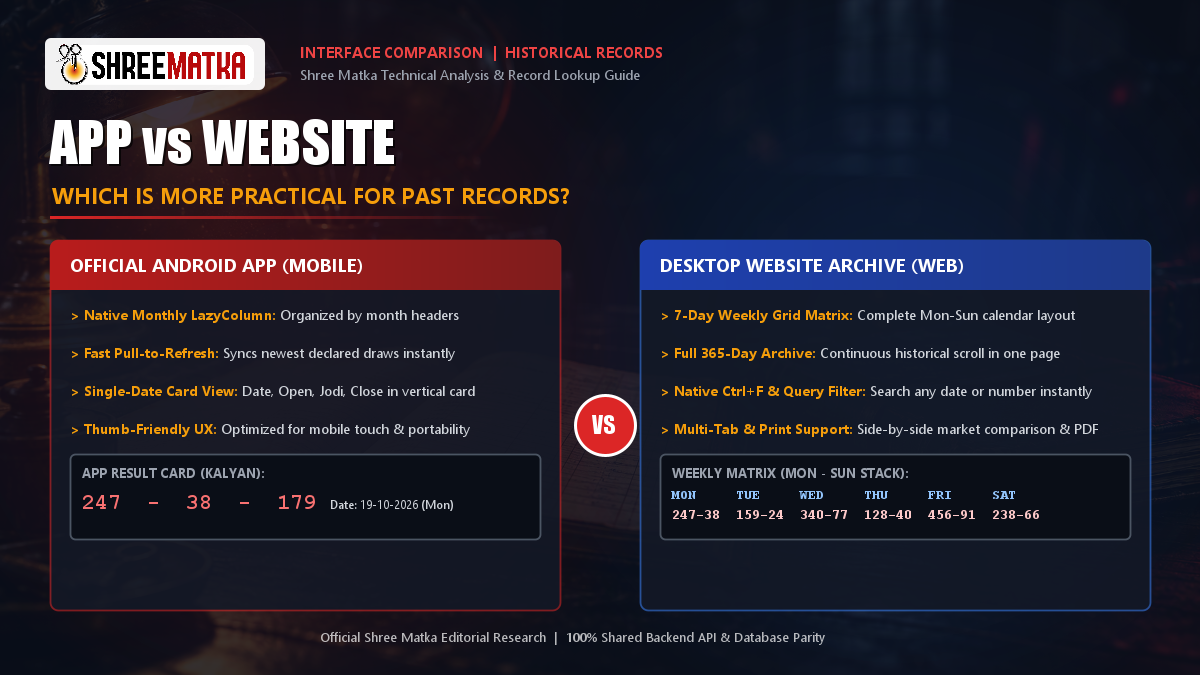
/chart/pana/kalyan) opens a complete weekly calendar matrix. Each row represents a 7-day Monday-to-Sunday cycle, presenting the date range on the far left, followed by seven individual day columns. - Stacked 3-Tier Cell Structure: Inside every cell of the weekly panel table, three distinct pieces of data are stacked vertically: the 3-digit Open Pana at the top, the 2-digit central Jodi in bold in the middle, and the 3-digit Close Pana at the bottom. Red Jodi combinations are highlighted with a distinct light-red background for instant visual recognition.
- 365-Day Historical Depth: The server-side controller generates up to 365 days of continuous historical records in a single scrollable document, allowing long-term review without requiring manual page-by-page clicking.
- Browser Utilities: Because the website runs in standard web browsers (such as Chrome, Firefox, Safari, and Edge), users can press Ctrl + F (or Cmd + F) to jump directly to any specific date string or numeric combination, open multiple market charts in adjacent tabs, bookmark canonical chart URLs, and use native print controls.
3. What the Actual Mobile App Offers
The official Shree Matka Android application (distributed as a verified direct APK download) approaches past records with a mobile-first design centered on touch interaction and portability:
-
Native Paginated Chart Screen: For Main Markets, the app uses a native Android Jetpack Compose
ChartScreencomponent. Rather than loading a massive 52-week table into memory all at once, the app loads records in sequential pages using an efficientLazyColumn. - Monthly Grouping: Historical entries in the native chart screen are segmented and grouped by month headers (for example, "October 2026", "September 2026"). This allows readers who only need recent entries to browse without scrolling through an enormous grid.
- Pull-to-Refresh: The top of the list supports a native swipe-down gesture to pull the newest declared results from the server into the historical view without reloading the entire application.
-
Dedicated Starline and Jackpot WebViews: For specialized games like Starline and Jackpot, the app utilizes an integrated
WebChartScreen. This embeds the server's clean chart rendering directly inside the app shell while automatically stripping out the site header, navigation bar, and footer to maximize the available mobile reading area. - Pinch-to-Zoom Support: The embedded web view enables pinch-to-zoom gestures, allowing mobile users to magnify small numeric digits on high-density smartphone screens without horizontal scrollbar clipping.
4. Comparing Navigation, Historical Access, and Readability
When evaluating practicality, three core factors determine the reader's lookup experience: how easy it is to locate older records, how clearly the numerical tables display, and how much context is visible simultaneously.
Screen Size and Information Density
A standard Satta Matka Panel chart is an inherently wide data structure. Each row contains 8 distinct columns (Date Range plus Monday through Sunday), and each day column contains three separate numbers. On a standard 1080p or 1440p desktop monitor, the entire 8-column layout displays with comfortable margins, sharp fonts, and zero horizontal clipping.
On a smartphone screen measuring 360 to 420 pixels wide, displaying 8 detailed columns side-by-side in portrait mode is mathematically impossible without either shrinking the font below readable thresholds or requiring horizontal scrolling. The website handles this on mobile by placing the table inside a container with overflow-x: auto. While this preserves numeric precision, the user must swipe horizontally back and forth to connect a Friday or Saturday result with the date column on the left.
The native mobile app solves this display challenge for main markets by restructuring the data into a vertical list of individual cards. Each card clearly displays the date, day of the week, open patti, central jodi, and close patti in a vertical stack. This makes mobile reading effortless for single dates, but it removes the weekly calendar overview that chart analysts rely on to spot column-based patterns.
Locating Specific Older Dates
If you are searching for a specific historical entry from three months ago (for instance, July 14th):
-
On the Desktop Website: You can open the market's panel chart, press Ctrl + F, type
Jul 14or14-07, and the browser instantly jumps to that exact weekly row with the matching cell highlighted. - On the Mobile App: You scroll downward through the list. As you approach the bottom of visible entries, the app's pagination triggers, loading the next set of results until you reach the desired month. This is intuitive with touch, but takes several seconds longer than an in-page text query.
Multi-Market Comparison
Historical analysis frequently involves comparing results across correlated markets—such as reviewing Milan Day alongside Kalyan, or examining Time Bazar before checking Rajdhani Day.
On a desktop web browser, a user can simply middle-click or right-click to open 3 or 4 charts in separate browser tabs, placing them side-by-side or switching with keyboard shortcuts (Ctrl + Tab). On the mobile app, navigation is strictly linear: to inspect a second market, you must exit the current chart, return to the dashboard, scroll to the next market, and open its chart.
5. App vs Website: A Factual Comparison Table
The table below provides a neutral, verified comparison of the record-lookup capabilities available across the official Shree Matka website and Android mobile app:
| Capability / Feature | Desktop / Mobile Website | Android Mobile Application | Lookup Practicality Winner |
|---|---|---|---|
| Layout Presentation | Authentic 7-day weekly calendar grid (Mon-Sun) with 3-digit stacks. | Vertical paginated list (Main markets); embedded web view (Starline/Jackpot). | Website for weekly context; App for single-date cards. |
| Historical Depth | Full 365-day archive rendered in a single continuous document. | Paginated continuous scroll (loads additional pages as user scrolls). | Tie (Both access complete database history). |
| Locating Specific Dates | Native browser in-page search (Ctrl+F) finds any date string instantly. | Manual vertical scroll through month-grouped cards. | Website (Substantially faster search speed). |
| Market Directory Search | Live query filter at /charts?q=... filters market cards in real time. |
Scrollable category tabs and vertical market cards. | Website (Faster text-based market filtering). |
| Multi-Tab Comparison | Supported natively; open multiple charts in separate tabs or split windows. | Single-screen navigation stack; must back out to switch markets. | Website (Superior for cross-market analysis). |
| Mobile Touch Usability | Requires horizontal swiping inside table containers on phone screens. | Clean vertical card cards optimized for thumb scrolling. | App (Better ergonomics for phone screens). |
| Copying & Data Sharing | Standard HTML table text; easy to highlight, copy, or paste into sheets. | Android text selection depends on view type; no direct table export. | Website (Far easier to extract data accurately). |
| Printing & PDF Archiving | Full browser print dialog (Ctrl+P) with page-scaling and landscape support. | No built-in print module; requires manual screenshotting. | Website (Built for physical/PDF archiving). |
| Offline Availability | Requires active connection to fetch chart pages. | Requires active connection to query database API. | Tie (Neither interface supports true offline lookup). |
Need Fast Mobile Record Checking?
Install the authentic Shree Matka Android APK to check yesterday's draw numbers and market cards directly on your phone.
6. Which Interface Is More Practical for Different Information Needs?
Because neither interface is universally superior for every scenario, choosing between the app and the website depends entirely on what kind of record lookup you are performing:
When the Website Is More Practical
- Studying 7-Day Weekly Cycle Patterns: Traditional Matka analysis relies heavily on evaluating column-aligned cycles—such as tracking how Monday's open numbers correlate with prior weeks or checking repeating Red Jodi intervals. Because the website renders a true 7-column calendar, pattern analysis is visually transparent.
- Compiling Multi-Market Spreadsheets: If you keep your own research notes or spreadsheets, copying tabular numbers from the website is straightforward. You can highlight entire rows, copy with Ctrl + C, and preserve the values. (Be sure to review our guide on why copying number tables without headings changes their meaning).
- Printing Charts on Paper: If you prefer physical records or wall charts, printing a 52-week panel chart directly from the website's print view is functional and customizable.
When the Mobile App Is More Practical
- Quick Daily Checks on the Go: If you are away from your computer and simply want to verify yesterday's close number or check the previous session result for Kalyan, opening the app and viewing the market card takes less than five seconds.
- One-Handed Phone Operation: Reading wide HTML tables on a smartphone often leads to accidental horizontal scrolling and misplaced columns. The mobile app's native card design eliminates lateral swiping entirely.
- Direct Touch Ergonomics: Pull-to-refresh gestures and large touch targets make navigating recent draw days fast and comfortable during daily commutes.
7. How to Verify the Date and Chart Before Relying on a Record
Regardless of whether you use the mobile app or the website, errors in chart reading frequently stem from misidentifying which record is currently visible on the screen. Before transcribing, quoting, or relying on any historical entry, execute this 4-point verification checklist:
- Confirm Market Name and Session: Many markets share similar naming conventions—such as Milan Day vs Milan Night, or Rajdhani Day vs Rajdhani Night. Always check the market header badge at the top of the screen before reading the numbers.
- Verify the Exact Draw Date vs Publication Date: Never confuse the date an article or website page was updated with the date the draw actually took place. Check the explicit date stamp beside the numbers (for detailed guidance, see our analysis on Article Publication Date vs Result Date: Which Date Are You Reading?).
-
Check for Complete vs Partial Draws: In live markets that operate across separate afternoon and evening sessions, a row may display an Open Pana and single digit while the Close Pana shows placeholder asterisks (
***) or a "Running" indicator. Never mistake an incomplete daily row for a final result. - Verify Field Alignment: On mobile web tables that require horizontal scrolling, ensure you have not scrolled so far right that the date column is hidden, causing you to associate a Friday result with a Thursday heading.
Frequently Asked Questions
Do past records on the Shree Matka app differ from the website?
Which platform is better for inspecting multi-month Pana charts?
Can I search for specific dates or markets on the website?
Does the Shree Matka mobile app work offline for past records?
Can I open multiple market charts at once on the app?
How can I verify which market and date I am reading in a record?
Experience Fast Historical Record Access
Download the official Shree Matka Android app for clean, thumb-friendly past record browsing and instant real-time draw declarations.
Download App
Comments (0)
Loading comments...