
Low-Bandwidth Chart Browsing: Checking Results Fast on 2G/3G Mobile Connections
Travel across smaller Indian towns, railway corridors, or crowded metro coaches right around 4:10 PM or 9:30 PM, and mobile bars often drop down to struggling 3G or congested 1-bar 4G.
Open a bloated ad-heavy chart website in those moments and your screen burns through megabytes of flashy GIFs before spinning endlessly into timeout. Knowing what makes lightweight web charts load in under one second saves both battery and patience.
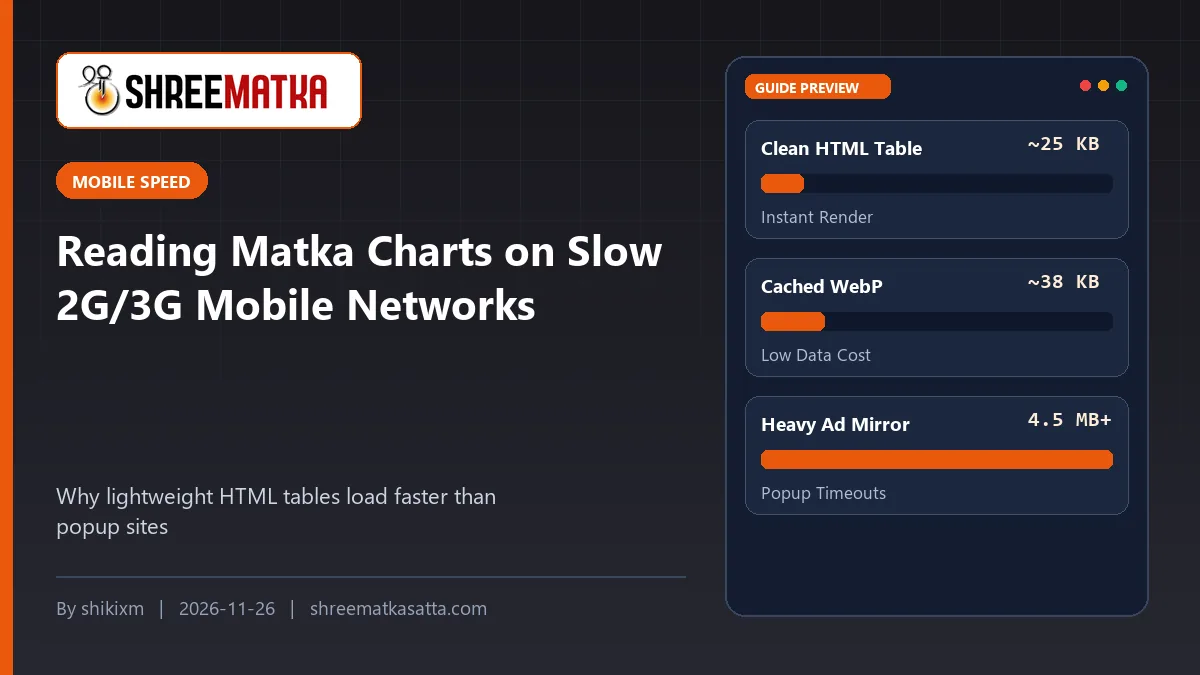
Compact HTML chart pages with Gzip compression load full result tables inside roughly 20 to 40 KB of data (fast enough to open on weak 2G/3G signals in under a second), whereas bloated mirror websites load megabytes of popup ad scripts and heavy banners. Direct bookmark URLs and clean WebP images keep lookup snappy anywhere.
Table of Contents
- Why Clean Text Tables Beat Heavy Script Pages on Trains
- What Slows Down Chart Pages on Weak Mobile Networks
- Four Smart Browser Habits When You Only Have One Signal Bar
- Speed and Visual Clarity Always Travel Together
- Why Direct Chart Bookmarks Save Half Your Daily Data
- Frequently Asked Questions
- Check Related Speed & Formatting Guides
Why Clean Text Tables Beat Heavy Script Pages on Trains
Think about how your mobile browser builds a web page. Tiny HTML digits travel over congested cell towers almost instantly, whereas giant ad JavaScript bundles force your phone processor to stop rendering while downloading scripts from five different ad exchanges.
Strip out those unnecessary third-party scripts and oversized PNG graphics, and even a two-year-old budget phone on slow mobile data shows clean market cards before a heavy mirror finishes connecting.
What Slows Down Chart Pages on Weak Mobile Networks
| Page Piece | Heavy Ad Mirror Site | Clean Modern Web Architecture |
|---|---|---|
| Main Table HTML | Spaghetti tables + inline scripts (300 KB+) |
Gzipped semantic HTML markup (~20–35 KB) |
| Header Banners & Logos | Multi-MB animated GIFs and old PNGs | Compact responsive WebP / AVIF (~25–45 KB) |
| Background Ad Trackers | 10+ external tracking scripts blocking rendering | Zero blocking pop-unders; page text displays first |
| Repeat Daily Checks | Forces re-downloading static files repeatedly | 7-day browser caching saves CSS/icons locally |
Four Smart Browser Habits When You Only Have One Signal Bar
You can shave several seconds off peak-hour lookups on any handset with four simple tricks:
- Bookmark exact archive paths directly: Open
/chart/jodi/kalyanor/chartsfrom a browser bookmark rather than typing into Google Search every afternoon and bouncing through search redirects. - Skip forwarded video summaries: Avoid 15 MB Telegram result recap videos when a 30 KB HTML row gives the exact verified number.
- Wait 45 seconds before hammering Refresh: Mashing reload ten times in five seconds congests your own weak mobile upload pipe, so pause calmly past draw time and refresh once.
- Use Lightweight Android App notifications: Where installed from the official portal, let push messages wake your screen rather than keeping heavy browser tabs spinning nonstop.
Speed and Visual Clarity Always Travel Together
As we covered across chart formatting principles and slow-page troubleshooting, simple borders, readable font sizes, and compressed WebP/AVIF media do more than just look tidy, they make pages genuinely usable everywhere across India.
On older Android phones with 2 GB or 3 GB RAM, closing twenty forgotten shopping and social video tabs running silently in the background frees up browser memory immediately, letting chart tables render crisp borders without white blank reloads.
Why Direct Chart Bookmarks Save Half Your Daily Data
Instead of opening heavy social media browsers inside WhatsApp or Telegram links every evening, copy your favorite archive link straight into standard Chrome or Firefox mobile bookmarks:
Every repeat tap reuses locally saved fonts and icons automatically (7-day browser cache), transferring only the lightweight fresh result text.
/chart/jodi/kalyan or /chart/jodi/main-bazar
/ (Homepage status cards load text-first)
/charts (Reach all markets without heavy banners)
When mobile bars drop very low, compact two-digit Jodi views load even lighter than multi-year Panel matrices while keeping every historical row exact.
Frequently Asked Questions
Roughly how much mobile data does viewing one Jodi chart consume?
On lightweight HTML portals with static styles already cached locally, refreshing a chart consumes well under 50–100 KB of mobile data.
Why do modern sites save cover images as .webp and .avif instead of .png or .jpg?
WebP and AVIF keep identical sharpness for text and logos while shrinking file sizes by roughly 75–90%, saving both mobile data and loading time.
Does Chrome Lite / Data Saver interfere with live updates?
Standard browser caching respects short freshness headers; tapping pull-to-refresh once pulls the latest live result right away without bloated ad reloads.
Check Related Speed & Formatting Guides
Keeping direct links handy turns weak-signal chart checks from an irritating wait into a two-second glance.
Explore these related readability articles: